
Choosing a reliable industrial LCD monitor supplier helps businesses develop durable interfaces for industrial equipment and self-service terminals. However, buyers must evaluate more than screen specifications. They should also consider ingress protection, touch technology, mounting requirements, and long-term integration needs.
For example, ticketing machines and industrial control cabinets often require different installation configurations. Therefore, OEM buyers should select a supplier that understands application requirements and supports practical customization.
An IP65 embedded monitor provides a useful solution for environments requiring front-panel protection against dust and water exposure. Moreover, flexible display sizes, touch options, and interface configurations help manufacturers integrate screens into different products.

How Can an Industrial LCD Monitor Supplier Meet Environmental Requirements?
Dust, water splashes, and cleaning procedures can influence monitor selection. Consequently, buyers should examine the installation environment before choosing an embedded display.
Self-service kiosks in transportation hubs may experience frequent contact and routine cleaning. Meanwhile, industrial control cabinets may require protection against airborne dust and occasional splashes.
Verify IP65 Protection and Installation Conditions
The featured embedded monitor offers an IP65-rated front panel. This rating indicates protection against dust ingress and water jets under specified test conditions.
However, front-panel protection does not automatically establish the same rating for the entire enclosure. Therefore, buyers should confirm the tested boundary, installation method, and applicable test documentation.
The product supports indoor and semi-outdoor applications. Nevertheless, direct sunlight, condensation, temperature variation, and chemical exposure require separate evaluation.
Additionally, mounting pressure and gasket compression can influence the installed protection level. OEM engineers should validate these details before production approval.
Which Touch Technology Suits Different Self-Service Applications?
Touch technology influences interaction methods, operating conditions, and user experience. Therefore, an experienced industrial LCD monitor supplier should explain the practical differences between available options.
Projected capacitive touch supports gestures and intuitive multi-touch interaction. Consequently, it suits self-checkout terminals, interactive wayfinding systems, and modern ticketing machines.
Resistive touch may suit interfaces that prioritize deliberate point selection or compatibility with certain stylus inputs. However, the appropriate choice depends on screen construction, user behavior, and operating conditions.
Match Touch Technology to the Application
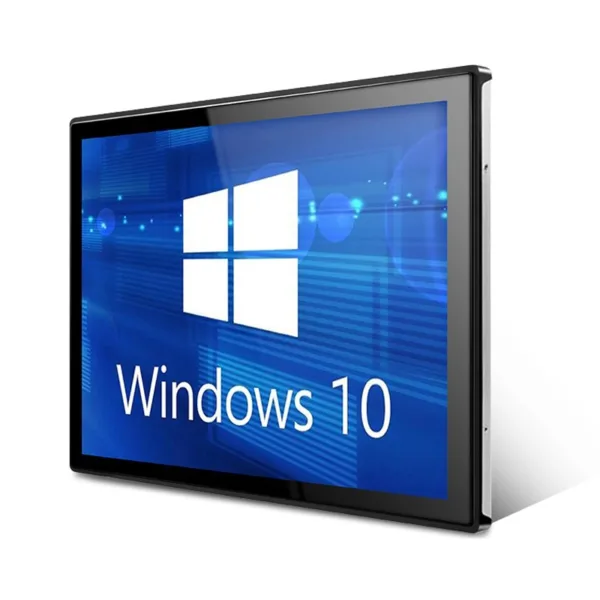
The featured product supports projected capacitive and resistive touch options. Buyers should specify their preferred technology during the quotation stage.
Additionally, teams should evaluate responsiveness, surface treatment, and operation with gloves when relevant. They should also test the selected touch configuration with the intended host system.
Anti-glare and anti-fingerprint treatments are available customization options. These features can support readability and routine maintenance, depending on the installation environment.
For public-facing equipment, OEM teams should also consider screen cleaning frequency and expected interaction patterns. As a result, the selected configuration can better reflect actual operating needs.
Explore our Industrial LCD Monitor Product Category for available embedded display options and customization possibilities.
How Should Buyers Compare Display Sizes and Interfaces?
An unsuitable display size can complicate enclosure design and application development. Likewise, incompatible interfaces may require additional hardware or redesign work.
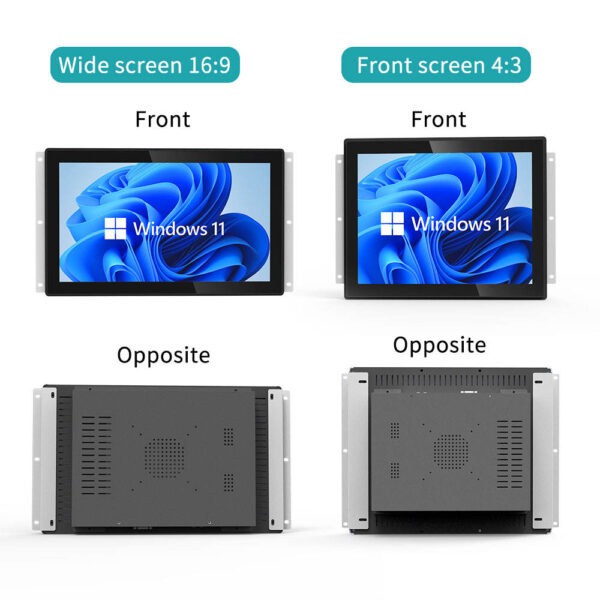
Therefore, buyers should confirm the display’s mechanical dimensions, active area, aspect ratio, and connection requirements. They should also consider cable routing and installation access.
Confirm Technical Specifications Before Ordering
The embedded monitor supports screen sizes from 7 inches to 27 inches. This range provides flexibility for compact control panels and larger interactive kiosks.
Available video interfaces include HDMI, VGA, and DisplayPort. USB supports touch connectivity, subject to the selected configuration.
The supplier also offers panel-mount, flush-mount, and rear-mount arrangements. Furthermore, customized brackets, bezel designs, logo printing, and cable routing can support product integration.
The following table summarizes key selection factors. Buyers should confirm the final configuration against the product drawing and approved quotation.
| Parameter | Available option | OEM evaluation point |
|---|---|---|
| Screen size | 7 inches to 27 inches | Check enclosure dimensions |
| Touch technology | Projected capacitive or resistive | Match user interaction requirements |
| Front-panel protection | IP65-rated design | Verify test evidence and installation conditions |
| Optical bonding | Optional | Assess readability and reflection requirements |
| Surface treatment | Anti-glare or anti-fingerprint | Consider lighting and cleaning practices |
| Video interfaces | HDMI, VGA, DisplayPort | Confirm host compatibility |
| Touch interface | USB | Verify touch-controller configuration |
| Mounting | Panel, flush, or rear mount | Review mechanical drawings |
| Customization | Bezel, logo, brackets, cable routing | Confirm feasibility and production scope |
| Certifications | Not specified in the supplied information | Request applicable compliance documents |
Can an Industrial LCD Monitor Supplier Support Optical Bonding and OEM Design?
Standard displays may not match every enclosure or operating environment. For this reason, OEM buyers often require mechanical, optical, or interface adjustments.
Optical bonding is available for this embedded monitor. It can reduce internal reflections and improve perceived readability under suitable viewing conditions.
However, actual results depend on the display stack, surface treatment, and ambient lighting. Therefore, buyers should evaluate samples under representative operating conditions.
Establish a Structured OEM Validation Process
First, provide mechanical drawings and application requirements. Next, confirm screen size, touch technology, interface selection, and mounting arrangements.
Additionally, specify the required protection level and intended cleaning procedures. If optical bonding is necessary, discuss its impact on optical performance and product cost.
Then, evaluate samples for touch response, image quality, connection stability, and installation fit. Finally, approve the agreed specifications before proceeding with volume production.
Choosing an industrial LCD monitor supplier also requires attention to engineering communication and documentation quality. A clearly defined approval process helps both parties manage revisions and production expectations.
Read our Technical Guide for practical advice on display integration, touch selection, and environmental requirements.
What Should Buyers Check Before Selecting a Long-Term Supplier?
A monitor designed for continuous operation must match the equipment’s actual operating conditions. The featured product targets 24/7 applications, including retail, healthcare, transportation, and industrial environments.
However, buyers should confirm operating temperature limits, thermal management requirements, and expected service life. They should also request supporting evidence for reliability claims.
Furthermore, verify quality-control procedures, customization scope, sample availability, and production consistency. These details help procurement teams assess whether a supplier can support the intended project.
Review Compliance and Lifecycle Requirements
The supplied product information does not identify specific regulatory certifications. Therefore, buyers should request relevant declarations, test reports, and compliance documents.
Depending on the destination market, projects may require electromagnetic compatibility testing or other regulatory assessments. Requirements vary according to the finished equipment and its intended application.
Additionally, clarify the responsibilities for spare parts, firmware compatibility, and future product revisions. These discussions can support more predictable product lifecycle planning.
Ultimately, a professional industrial LCD monitor supplier should provide clear specifications and explain customization boundaries. This approach helps OEM buyers align technical requirements with budget and production objectives.
Q&A: Industrial LCD Monitor Supplier Selection
Q1: What makes an industrial LCD monitor supplier suitable for kiosk projects?
Look for application knowledge, flexible mounting options, touch technology choices, and documented protection performance. Additionally, confirm engineering support and sample validation procedures.
Q2: Does an IP65-rated monitor provide complete waterproof protection?
Not necessarily. Buyers should verify whether the rating applies to the front panel or the complete enclosure. Installation conditions and applicable test evidence also matter.
Q3: Can buyers customize screen size and touch technology?
Yes. This product supports sizes from 7 inches to 27 inches, with projected capacitive or resistive touch. Specific configurations require technical confirmation.
Q4: Is optical bonding necessary for every kiosk display?
No. Optical bonding may benefit installations with challenging reflections or readability requirements. However, the decision should follow application testing and cost evaluation.
Q5: What information should buyers provide when requesting an OEM quotation?
Provide the target screen size, touch requirements, interface preferences, mounting drawings, and environmental conditions. Also, specify expected quantities and required compliance documents. This information helps the supplier evaluate feasibility and prepare a relevant proposal.