
Modern businesses require reliable visual technology to manage daily operational tasks. Choosing an interactive touch monitor ensures smooth workflow integration and high employee efficiency. These commercial touch display systems deliver precise interface navigation and lead-free compliance for eco-friendly setups. Consequently, upgrading your equipment prevents unexpected system failures in demanding business environments.
High-Traffic Commercial Pain Points
Commercial environments constantly challenge standard digital screens with rigorous, continuous usage. Standard consumer monitors often fail quickly under heavy commercial workloads. Therefore, understanding key operational challenges helps you select better technical solutions.
Frequent Screen Wear in POS Terminals
Retail checkout lanes process hundreds of transactions every single day. Fast-paced cashier tapping causes surface scratches on low-grade commercial screens. Eventually, unresponsive touch areas slow down payment collection and create longer customer lines. Investing in durable hardware eliminates expensive hardware replacements and keeps revenue flowing smoothly.
Environmental Hazards in Hospitality Kiosks
Restaurants and self-service kiosks face constant fluid spills and sticky grease accumulation. Unprotected displays suffer from moisture ingress, which leads to internal electrical short circuits. Furthermore, inconsistent touch registration frustrates customers during peak order hours. Sealed front bezels shield delicate internal components against liquid damage.
Unstable Mounting in High-Traffic Information Hubs
Busy public spaces require robust physical mounting for interactive information displays. Lightweight consumer stands tilt or wobble when users apply firm pressure. Additionally, poor heat dissipation causes screens to overheat during continuous 24/7 operation. Industrial-grade housings ensure long-term stability and optimal thermal management.
Key Technical Solutions for Daily Reliability
Modern touch monitors incorporate advanced engineering to withstand demanding industrial usage. Below are the key engineering specifications that drive commercial reliability.
Projected Capacitive Touch & High-Strength Construction
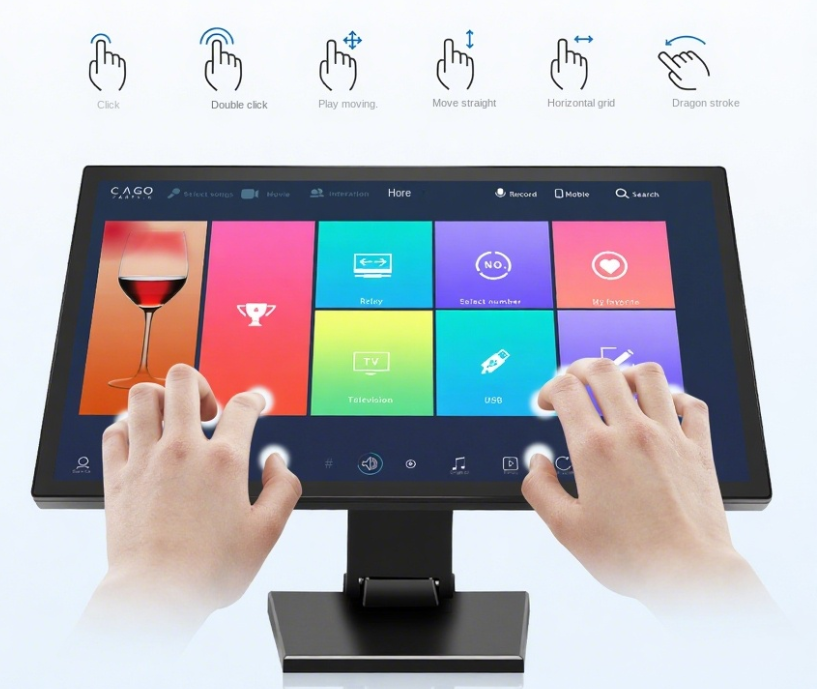
Our 21.5-inch Touch Screen Monitor features projected capacitive (PCAP) 10-point touch technology for smooth operation. Built with high-strength plastic, this reliable touch screen monitor delivers vivid visual performance. Furthermore, it supports fast, accurate touch input even in busy commercial spaces.
Designed specifically for POS, hospitality, and information displays, it handles continuous daily operations effortlessly. It can also be quickly installed on a countertop. It serves as a practical touch screen monitor for modern retail and commercial environments.
Industrial Protection & Electrical Standards
Commercial monitors require robust internal safeguards to survive continuous operation. High IP-rated front panels protect internal circuitry from dust accumulation and liquid splashes. Meanwhile, industrial power supplies prevent voltage spikes from damaging sensitive controller boards. Integrated circuit protection significantly extends product lifespan in busy facilities.
Enhancing Operational Efficiency Across Sectors
Implementing specialized touch hardware delivers immediate operational improvements across multiple business applications.
Retail Point-of-Sale (POS) Systems
Compact touch displays streamline checkout procedures by minimizing physical keystrokes. Cashiers navigate intuitive visual interface menus rapidly during peak business hours. As a result, line wait times decrease and total customer satisfaction improves. Clear visual contrast also reduces input errors during price overrides or inventory checks.
Self-Service Hospitality Terminals
Interactive kiosk displays allow customers to customize orders and complete digital payments independently. High-contrast screens maintain clear visibility under bright indoor lighting conditions. Consequently, businesses increase average order values through automated upselling prompts on screen. Sealed screens facilitate quick sanitization between customer uses.
Interactive Corporate Information Displays
Corporate lobbies utilize touchscreen displays for wayfinding maps and interactive directory navigation. Clear visual layouts help guests find meeting rooms and departments without staff assistance. Furthermore, energy-efficient LED backlights reduce facility power usage over time. Durable housings protect the hardware against daily public interaction.

Key Considerations for Choosing Your Display
Selecting the right commercial display requires evaluating specific environmental and operational parameters.
-
Touch Technology Selection: Choose PCAP touch for smooth, glass-smooth multi-touch gestures.
-
Screen Size & Resolution: Select a 21.5-inch Full HD screen for optimal space usage and clarity.
-
Enclosure Durability: Ensure high-strength plastic or metal housing shields against accidental impacts.
-
Regulatory Compliance: Confirm CE, FCC, and lead-free compliance for reliable, safe operation.
Upgrade Your Commercial Infrastructure Today
Selecting an interactive touch monitor ensures long-term operational success for your enterprise. Durable construction and responsive touch controls reduce maintenance costs while improving service speed. Explore our product line today to upgrade your business displays with high-performance hardware.