

Choosing the right industrial touch screen monitor requires more than checking screen size. Buyers should evaluate display brightness, touch accuracy, interface compatibility, and thermal design. Moreover, industrial displays need suitable mechanical structures. These factors influence installation, operation, and long-term maintenance.
For equipment manufacturers and system integrators, a suitable industrial touch display should match the actual working environment. Therefore, technical specifications and customization options deserve careful attention.
How Important Is Screen Brightness in Industrial Environments?
Industrial displays often operate under different lighting conditions. For example, factory operators may work near large windows or bright production areas. Meanwhile, control rooms usually provide more controlled lighting.
Consequently, screen brightness should match the installation environment.
Select Suitable Brightness for Different Applications
A standard brightness display can serve many indoor applications. However, brighter environments may require higher luminance.
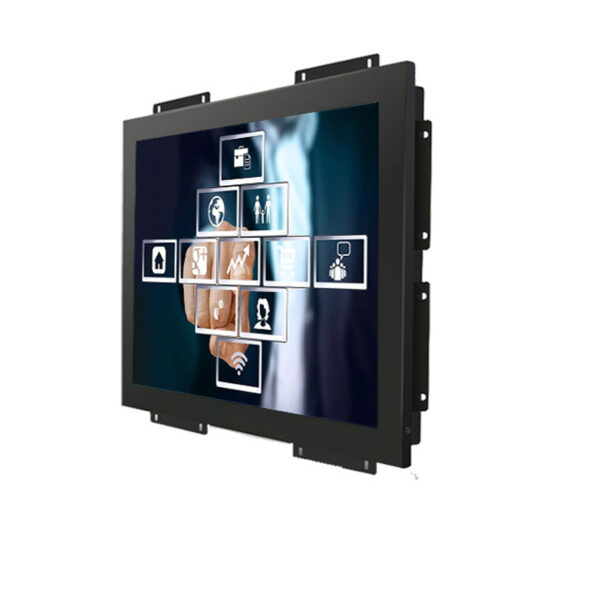
This 21.5-inch industrial monitor offers several brightness configurations:
- 350 cd/m² for standard indoor environments
- 1000 cd/m² for brighter industrial spaces
- 1500 cd/m² as an optional high-brightness configuration
Additionally, the IPS panel provides a 178-degree horizontal and vertical viewing angle. Its Full HD resolution reaches 1920 × 1080 pixels.
These specifications support clear information presentation. Therefore, buyers can select brightness according to installation conditions.

Which Touch Technology Suits Industrial Operations?
Touch interaction affects operator efficiency. In manufacturing environments, workers often use touchscreens to access machine settings and production data.
Therefore, buyers should consider touch technology and interface compatibility together.
Projected Capacitive Touch Technology
This monitor uses projected capacitive touch technology. It supports responsive interaction for industrial control applications.
For example, operators can access equipment menus and monitoring interfaces. Meanwhile, system integrators can incorporate the display into customized control terminals.
The 21.5-inch screen provides an active display area of 477.9 × 269.8 mm. Its 16.7 million color support also helps present detailed visual information.
However, buyers should confirm touch controller compatibility. They should also evaluate the operating system and application requirements.

How Do Interfaces Affect Industrial Monitor Integration?
Industrial equipment often uses different connection standards. Some systems require HDMI. Others rely on VGA or specialized video interfaces.
Therefore, interface selection should happen early in project planning.
Flexible Interface Configuration
The standard configuration includes:
- VGA
- HDMI
- USB
Additionally, customers can request DVI, AV, or BNC interfaces.
The supplier also supports interface customization. This provides greater flexibility for different industrial control systems.
For example, an equipment manufacturer may integrate the display into an existing machine cabinet. In this case, interface selection should match the controller and signal source.
Explore Our Industrial Display Products

Why Should Industrial Buyers Check Housing and Thermal Design?
Industrial displays often operate for extended periods. Therefore, enclosure strength and heat management deserve attention.
A suitable housing also helps simplify equipment installation.
Metal Housing and Heat Dissipation
This industrial touch monitor features an all-metal housing. Its metal spray-painted surface supports practical industrial use.
Additionally, the hidden key panel creates a cleaner front appearance. It also supports multiple languages.
The embedded buckle design helps integrate the display into compatible equipment panels.
Furthermore, the monitor uses an industrial thermal management design. Its operating temperature range extends from 10°C to 60°C.
The rated power consumption is 35W. Therefore, system designers can consider its thermal and electrical requirements during cabinet planning.
What Specifications Should Buyers Compare Before Ordering?
For B2B procurement, product specifications should match the complete application. Screen size alone cannot determine suitability.
Buyers should also check brightness, resolution, interfaces, mounting structure, and operating temperature.
21.5-Inch Industrial Touch Monitor Specifications
| Specification | Product Details |
|---|---|
| LCD Type | 21.5-inch TFT-LCD |
| Panel Technology | IPS |
| Resolution | 1920 × 1080 (FHD) |
| Active Area | 477.9 × 269.8 mm |
| Dot Pitch | 0.24825 × 0.24825 mm |
| Viewing Angle | 178° / 178° |
| Contrast Ratio | 1000:1 |
| Standard Brightness | 350 cd/m² |
| Optional Brightness | 1000 / 1500 cd/m² |
| Color Support | 16.7 million colors |
| Touch Technology | Projected Capacitive |
| Standard Interfaces | VGA / HDMI / USB |
| Optional Interfaces | DVI / AV / BNC |
| Operating Temperature | 10°C to 60°C |
| Power Consumption | 35W |
| Housing | All-metal enclosure |
| Installation | Embedded buckle design |
Customization for Different Industrial Projects
Different equipment projects often have specific integration requirements.
For instance, some customers need higher brightness. Others require additional video interfaces or customized front-panel arrangements.
Therefore, buyers should discuss these details before production.
A suitable supplier should evaluate the display environment and system configuration. This helps control project costs while maintaining the required product quality.
How Can B2B Buyers Improve Procurement Value?
Industrial monitor purchasing involves more than unit pricing. Buyers should consider product consistency, customization support, and application compatibility.
For equipment manufacturers, stable specifications simplify product integration. Meanwhile, distributors benefit from flexible configurations for different customer groups.
This 21.5-inch industrial touch monitor offers multiple brightness and interface options. Its metal housing and embedded installation structure also support different equipment designs.
Furthermore, customized configurations help buyers avoid unnecessary specifications. This approach can improve purchasing efficiency and overall value.
Read Our Industrial Display Technical Guides
Q&A: Industrial Touch Screen Monitor Selection
Q1: Is a 21.5-inch industrial monitor suitable for factory equipment?
Yes. Its Full HD resolution and capacitive touch technology support industrial control interfaces. However, buyers should check installation dimensions.
Q2: Can this monitor support 1000 cd/m² or 1500 cd/m² brightness?
Yes. Both higher-brightness configurations are optional. Buyers can select according to ambient lighting conditions.
Q3: Can customers customize the monitor interfaces?
Yes. Standard interfaces include VGA, HDMI, and USB. DVI, AV, and BNC options are also available.
Q4: What is the operating temperature range?
The specified operating temperature range is 10°C to 60°C. Buyers should consider actual cabinet temperatures.
Q5: What should wholesale buyers confirm before ordering?
Confirm screen dimensions, brightness, interfaces, and mounting requirements. Also discuss customization and project quantities with the supplier.