
A large touch screen display monitor helps businesses improve customer interaction and daily operations. For retailers, hotels, and service providers, screen size and touch accuracy matter. Display clarity, installation flexibility, and long-term reliability also influence purchasing decisions.
Today, commercial buyers need more than a large display. They need equipment that fits their software, workspace, and operating requirements. Therefore, choosing a suitable commercial touch screen monitor requires a practical review of application needs.
This guide explores key buying considerations for wholesale distributors, system integrators, and OEM buyers. It also introduces a 23.8-inch FHD touch monitor for commercial applications.

How Can a Large Touch Display Improve POS Operations?
Point-of-sale systems support checkout, order management, and customer service. Consequently, screen visibility and responsive touch control can improve daily workflows.
A compact display may suit counters with limited space. However, larger screens provide more room for menus and transaction information. Staff can also access interface elements more comfortably.
What Display Features Matter for POS Applications?
A 23.8-inch screen offers a practical balance between visibility and counter space. The featured model uses an IPS TFT-LCD panel with Full HD resolution.
Its 1920 × 1080 resolution presents text, icons, and product images clearly. Moreover, the 16:9 display ratio supports many commercial software interfaces.
The monitor also features multi-point capacitive touch. This technology supports responsive interaction for compatible POS applications.
For retailers managing busy counters, these features help create a more accessible interface. However, buyers should confirm software compatibility before placing bulk orders.
What Should Hotels Consider When Choosing a Touch Monitor?
Hotels use interactive displays across reception desks, service counters, and information points. Each location has different requirements for screen placement and daily operation.
For example, reception staff may need quick access to booking information. Meanwhile, self-service stations may display instructions and service options.
How Does Installation Flexibility Support Different Layouts?
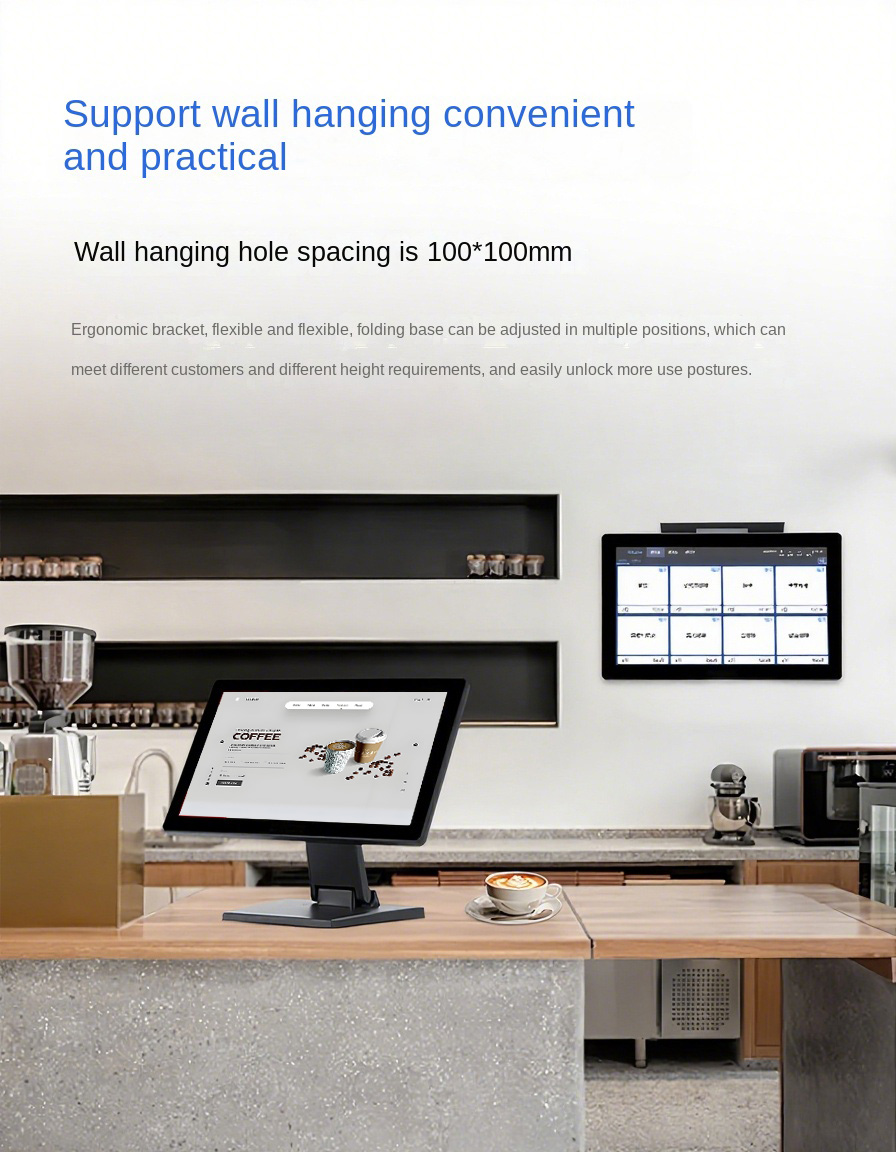
A suitable commercial touch screen display should fit the available furniture and mounting arrangement. Buyers should confirm mounting options before finalizing their equipment plans.
The featured monitor supports commercial POS and hospitality applications. Its high-strength plastic housing offers a practical enclosure for everyday indoor environments.
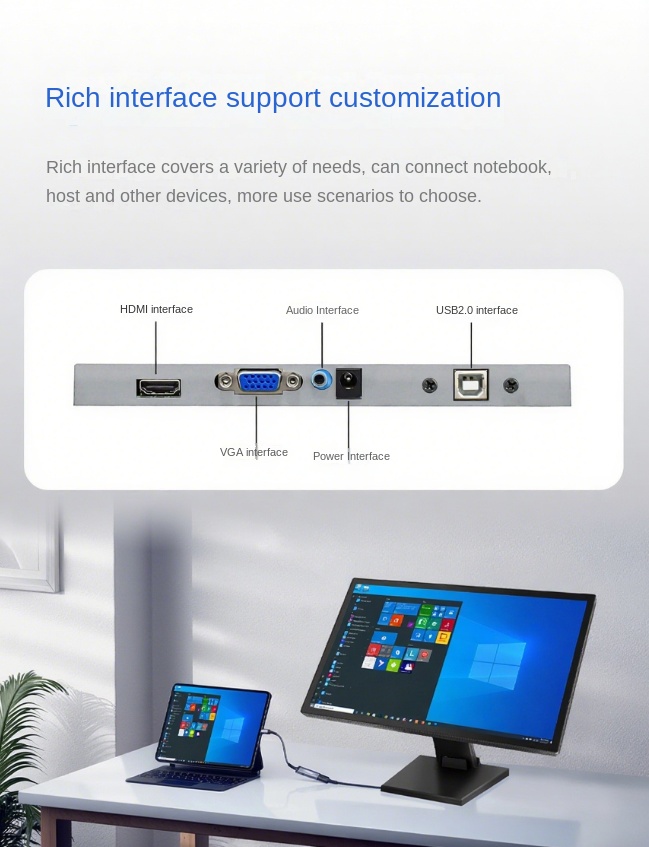
Additionally, its VGA connection comes standard. HDMI and DVI are optional, while USB touch connectivity supports touch input.
These connection choices help buyers evaluate compatibility with existing systems. Nevertheless, confirm the required interfaces with your system integrator.
Welcome to explore our commercial touch screen monitor products to discover display options for POS, hospitality, and information systems.
How Can Buyers Balance Display Quality and Purchasing Costs?
Wholesale buyers must consider more than the initial unit price. Product consistency, component quality, compatibility, and after-sales support also affect total purchasing value.
A monitor with suitable specifications can help avoid unnecessary upgrades. Therefore, buyers should match display performance with actual operating conditions.
Which Specifications Deserve Attention?
Brightness, contrast, viewing angles, and response time influence the user experience. For example, 300 candelas per square meter suits many standard indoor environments.
The featured model offers a 1000:1 contrast ratio. Its viewing angles reach 170 degrees horizontally and 160 degrees vertically.
Furthermore, the listed response time is 5 milliseconds. The display supports 16.7 million colors for commercial interface content.
These specifications provide a useful reference for indoor POS and service applications. For brighter locations, buyers should assess ambient lighting before confirming the model.
What Should OEM Buyers Confirm Before Bulk Purchasing?
OEM projects often involve specific branding, system integration, and installation requirements. As a result, buyers should discuss technical details before production begins.
A clear specification sheet helps suppliers assess project feasibility. It also reduces misunderstandings during sampling and order confirmation.
Which Details Should Be Confirmed?
First, identify the required screen size and resolution. Next, confirm the touch technology and interface configuration.
Then, review mounting requirements and operating conditions. Finally, discuss packaging, logo options, order quantities, and quality inspection procedures.
For projects requiring different touch technologies, ask about available configurations. The product page lists resistive, surface acoustic wave, and infrared touch as optional technologies.
However, availability may depend on the project configuration. Buyers should request written confirmation before approving samples.
Welcome to read our touch screen monitor technical guide to understand display technologies, interfaces, and product selection considerations.
What Are the Main Specifications of This 23.8-Inch Monitor?
The following table summarizes the published specifications. Buyers can use it when comparing commercial display requirements.
| Specification | Product details |
|---|---|
| Product category | Commercial touch screen monitor |
| Screen size | 23.8 inches |
| Panel type | IPS TFT-LCD |
| Resolution | 1920 × 1080 Full HD |
| Display ratio | 16:9 |
| Brightness | 300 candelas per square meter |
| Contrast ratio | 1000:1 |
| Viewing angle | 170° horizontal, 160° vertical |
| Response time | 5 milliseconds |
| Color support | 16.7 million colors |
| Touch technology | Multi-point capacitive |
| Touch interface | USB standard, RS232 optional |
| Video interface | VGA standard, HDMI and DVI optional |
| Listed duration | 50,000 hours |
Specifications are based on the published product information. Confirm the final configuration with the supplier.
How Can Businesses Choose a Reliable Wholesale Supplier?
A dependable supplier should provide clear specifications and consistent communication. Furthermore, buyers should review sample quality before confirming large orders.
Ask about production capacity, inspection procedures, packaging, and warranty terms. These details help purchasing teams evaluate supply reliability.
For OEM projects, communication matters throughout the process. A supplier should understand the application and clarify technical requirements before production.
ZWI Touch offers touch screen monitor options for commercial display applications. Its 23.8-inch FHD model suits POS, hospitality, and information display environments.
Welcome to explore our large touch screen display monitor solutions for wholesale purchasing and OEM project discussions. Contact the team to confirm specifications, customization possibilities, and quotation details.
Choosing the right monitor starts with understanding your application. With suitable display performance and a clear purchasing plan, businesses can build practical commercial touch solutions.