
An industrial touch monitor helps manufacturers operate machinery, monitor production, and manage automation systems. Unlike displays designed primarily for office use, industrial displays can offer features suited to demanding work environments. These include a protective front panel, flexible touch technologies, and broad power input. For B2B buyers, the right industrial touch monitor balances durability, usability, integration, and total purchasing cost.
How Do You Match an Industrial Monitor to Factory Conditions?
Factory floors often involve dust, oil splashes, vibration, and frequent operator interaction. Therefore, buyers should assess the installation environment before selecting a display. A suitable industrial touch monitor can simplify equipment integration and daily operation.
Check Front-Panel Protection and Chassis Construction
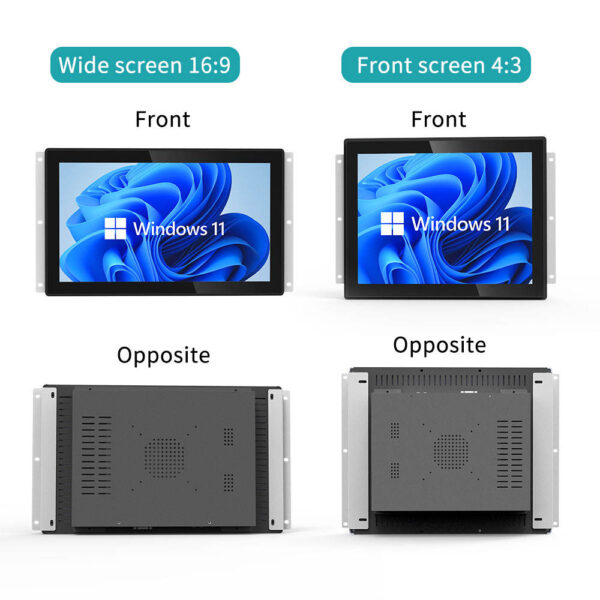
The featured industrial equipment touch screen uses a metal chassis and an IP65-rated front panel. This rating indicates protection against dust ingress and water jets under defined testing conditions. However, it does not automatically make the entire monitor waterproof.
For CNC equipment and control cabinets, front-panel protection can support routine operation. Meanwhile, the installation team should consider rear ventilation, cable entries, and enclosure design. These factors help determine the protection level of the complete system.
For applications involving frequent cleaning, confirm compatible cleaning agents with the supplier. Also, check whether the installation exposes connectors or rear components to moisture.
Explore our industrial display product category to review configurations for different automation projects.
Which Touch Technology Fits Your Operators?
Operators interact with industrial interfaces in different ways. Some wear protective gloves, while others need precise gestures or multi-touch controls. Therefore, the best industrial touch monitor depends on the actual workflow.
Choose Resistive or Projected Capacitive Touch
The product series offers four-wire and five-wire resistive touch options. It also supports projected capacitive touch technology. These options help system integrators match the interface to operator habits.
| Touch Technology | Suitable Applications | Key Considerations |
|---|---|---|
| Four-wire resistive | Basic machine controls and simple interfaces | Confirm expected usage intensity |
| Five-wire resistive | Industrial interfaces requiring resistive input | Verify controller and operating system support |
| Projected capacitive | Modern interfaces and multi-touch control | Check glove compatibility and moisture conditions |
Resistive touch can suit workflows involving styluses or compatible gloves. Meanwhile, projected capacitive touch supports responsive gestures and multi-touch interfaces. However, glove performance varies by glove material and touch configuration.
Before ordering, test the intended touch technology with actual operators. This step helps avoid unnecessary customization and supports better purchasing decisions.
How Can Power and Brightness Improve Installation Flexibility?
Automation equipment may use different power systems and operate under varying lighting conditions. Consequently, buyers should verify both input voltage and display brightness. These specifications affect installation planning and operator visibility.
Match Voltage Input to the Control System
The featured industrial touch monitor supports direct current input from nine to thirty-six volts. This range gives integrators flexibility when connecting compatible industrial power supplies. Nevertheless, the selected power source must remain within the specified input range.
The product information also lists brightness options up to one thousand nits. These configurations can improve readability in bright industrial areas and some semi-outdoor installations. However, direct sunlight readability also depends on reflections, viewing angles, and display treatment.
For outdoor-facing equipment, consider anti-glare treatment and optical bonding. Ask the supplier to confirm available options and their effect on display performance.
Which Interfaces and Mounting Options Simplify Integration?
Industrial systems often combine monitors with industrial personal computers, programmable logic controllers, and embedded systems. Therefore, interface compatibility should guide product selection from the beginning.
Confirm Connections, Temperature Range, and Installation
The product supports Video Graphics Array, High-Definition Multimedia Interface, DisplayPort, and Universal Serial Bus touch connections. These interfaces provide options for connecting compatible computing and control equipment.
The stated operating temperature range runs from minus twenty to seventy degrees Celsius. Buyers should confirm that the complete configuration supports the temperature conditions at the installation site.
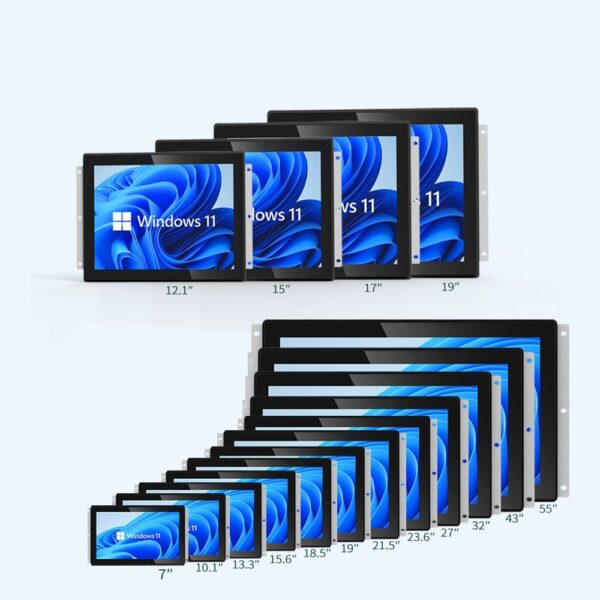
The series also offers open-frame and Video Electronics Standards Association mounting options. Available screen sizes include fifteen inches, seventeen inches, nineteen inches, twenty-one point five inches, and twenty-three point eight inches.
Review our industrial monitor technical guide to help plan interfaces, mounting, and environmental requirements.

How Should B2B Buyers Compare Quality and Total Cost?
A competitive purchase price matters, but procurement teams also need consistent quality and predictable integration. Therefore, compare documented specifications, inspection procedures, customization options, and supplier support.
Review the Key Specifications Before Bulk Purchasing
The following table summarizes the supplied specifications. It also highlights details buyers should verify before confirming an order.
| Evaluation Item | Available Specification | Buyer Verification |
|---|---|---|
| Front-panel protection | IP65-rated | Confirm test documentation and installation limits |
| Chassis | Metal construction | Check material and finish details |
| Touch options | Four-wire, five-wire resistive, and projected capacitive | Confirm the selected configuration |
| Input voltage | Direct current, nine to thirty-six volts | Match the site power supply |
| Brightness | Options up to one thousand nits | Confirm actual brightness for the chosen model |
| Operating temperature | Minus twenty to seventy degrees Celsius | Verify configuration-specific test data |
| Interfaces | Video Graphics Array, High-Definition Multimedia Interface, DisplayPort, Universal Serial Bus | Confirm port availability and host compatibility |
| Mounting | Open frame and Video Electronics Standards Association options | Check dimensions and mounting drawings |
| Certifications | Not specified in the supplied information | Request applicable compliance documents |
Shenzhen Zhiwei Technology supports original equipment manufacturer and original design manufacturer services. Available customization includes boot logos, optical bonding, anti-glare treatment, and custom enclosures.
For distributors and system integrators, these options can support project-specific requirements. Meanwhile, standardized configurations may simplify repeat orders and inventory planning.
Before purchasing, request a quotation that separates standard features from optional upgrades. Also, confirm warranty terms, inspection procedures, packaging, and technical support. These details help buyers evaluate overall value more accurately.
Build a Display Solution Around Your Automation Needs
Choosing the right industrial touch monitor starts with the operating environment. Next, evaluate touch technology, brightness, power input, interfaces, and mounting requirements. Finally, confirm compliance documentation and customization details with the supplier.
For CNC manufacturers, automation integrators, and industrial equipment distributors, a well-matched display can support practical operation and easier system integration. Shenzhen Zhiwei Technology offers multiple configurations and OEM or ODM customization. Contact the team to discuss your application, order volume, and target budget.