
A touch panel monitor helps restaurants streamline self-service ordering and payment workflows. For quick-service restaurants, cafés, and food courts, a responsive touch screen monitor supports menu browsing, order selection, and customer interaction. Meanwhile, clear visuals and flexible mounting help businesses create practical ordering stations. For B2B buyers, choosing a reliable display also means balancing image quality, installation needs, durability, and purchasing costs.
Why Do Restaurants Need Better Self-Service Ordering?
During lunch and dinner rushes, customers often need to browse menus quickly. Meanwhile, staff must manage orders, payments, and food preparation. A suitable touch panel monitor gives customers a direct interface for selecting items. Consequently, restaurant teams can organize ordering workflows more efficiently.
Use QHD Resolution for Clear Menu Presentation
The featured desktop touch screen monitor offers a resolution of 2560 by 1440 pixels. This QHD display helps present menu images, product options, and promotional content with clear detail. In addition, its 100 hertz refresh rate supports smooth visual transitions.
For example, restaurants can display meal combinations, ingredient choices, and optional extras. However, the final interface also depends on the ordering software and computer hardware. Buyers should therefore confirm compatibility before deployment.
Explore our commercial display product category to review options for different business environments.

How Can a Touch Screen Monitor Simplify Customer Interaction?
Customers expect ordering interfaces to feel intuitive. However, screen layout, touch responsiveness, and software design all influence usability. A well-selected touch panel monitor provides a practical foundation for self-service applications.
Match the Display to the Ordering Workflow
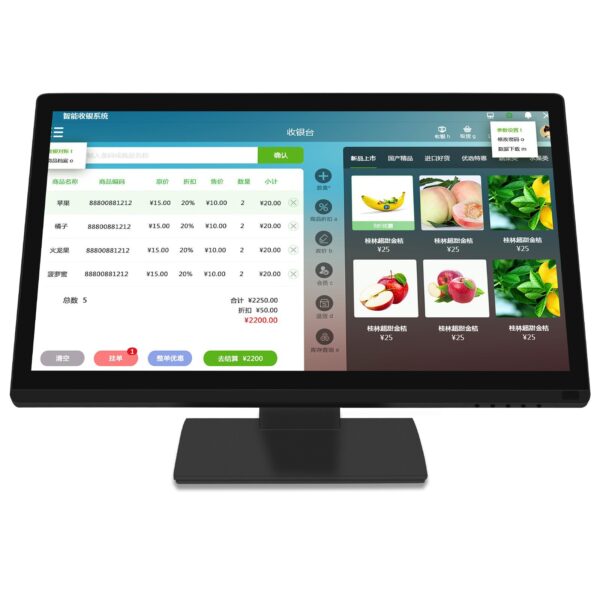
The featured monitor combines touch control with a high-resolution display. This setup suits interactive menus, digital information points, and compatible point-of-sale applications. Moreover, the large viewing area gives designers room to arrange categories and product details.
Restaurant operators can organize the interface into clear steps. First, customers select their meals. Next, they customize options and review their orders. Finally, they proceed through the supported payment workflow.
The monitor itself does not guarantee faster transactions. Instead, results depend on software design, payment integration, network conditions, and staff procedures.
Which Mounting Options Suit Different Restaurant Layouts?
Restaurant layouts vary across counters, kiosks, pickup areas, and compact cafés. Therefore, installation flexibility matters when selecting a commercial touch panel monitor. Buyers should consider counter depth, viewing height, cable routing, and customer access.
Choose Flexible Mounting for Space Planning
The featured monitor supports wall mounting. Its mounting hole spacing measures 100 by 100 millimeters. Therefore, installers can assess compatibility with suitable wall brackets and mounting hardware.
Additionally, the folding base supports multiple adjustment positions. This feature helps businesses adapt the display to different counter heights and working postures. However, a wall-mounted self-service station requires suitable structural support and accessible cable connections.
For larger projects, confirm the mounting method before finalizing kiosk dimensions. You can also consult our technical guide for further display selection considerations.

How Can Businesses Balance Quality and Purchasing Costs?
B2B buyers often manage multiple locations, equipment budgets, and future replacement needs. Therefore, the purchase price should form only part of the evaluation. Display clarity, mounting flexibility, supplier consistency, and technical support also affect long-term value.
Evaluate Practical Features Before Bulk Purchasing
The monitor uses a high-strength plastic housing. This construction offers a practical option for everyday commercial display environments. However, buyers should request additional durability information for installations exposed to frequent contact or intensive cleaning.
Before placing a wholesale order, check the following points:
- Confirm the touch technology and operating system compatibility.
- Request details about brightness, viewing angles, and touch response.
- Verify supported input ports and power requirements.
- Ask about production consistency and quality inspection procedures.
- Confirm packaging, warranty terms, and after-sales support.
A qualified supplier should explain these details clearly. As a result, buyers can compare quotations based on both product suitability and total purchasing value.
What Should Buyers Check Before Ordering Touch Panel Monitors?
Restaurants have different installation and operating requirements. Consequently, buyers should compare documented specifications rather than assume every commercial display meets the same needs.
Review Specifications and Compliance Documents
The following table summarizes the available product details. It also identifies information buyers should confirm before bulk purchasing.
| Evaluation Item | Featured Monitor | Buyer Consideration |
|---|---|---|
| Display size | 23.8-inch class | Confirm actual active display dimensions |
| Resolution | 2560 by 1440 pixels | Suitable for detailed menus and interface content |
| Refresh rate | 100 hertz | Supports smooth visual transitions |
| Touch control | Supported | Confirm touch technology and operating system compatibility |
| Housing | High-strength plastic | Request durability and cleaning guidance |
| Mounting | Wall mounting supported | Verify 100 by 100 millimeter bracket compatibility |
| Stand | Adjustable folding base | Check required viewing positions |
| Certifications | Not specified | Request applicable compliance documents |
The product description identifies the monitor as a 24-inch model, while its detailed description states 23.8 inches. Therefore, buyers should confirm the official model specification before ordering.
Likewise, the available information does not identify specific safety or environmental certifications. Request relevant test reports and declarations when procurement policies require them.
Build a Cost-Effective Self-Service Display Plan
A touch panel monitor can support more organized ordering across restaurants, cafés, and food courts. QHD resolution, touch interaction, and flexible mounting provide useful foundations for commercial applications. Meanwhile, careful compatibility checks help buyers match equipment to their actual workflows.
For distributors, restaurant equipment suppliers, and multi-site operators, consistent specifications also simplify purchasing and deployment. Ask the supplier about bulk pricing, quality inspection, packaging, and technical support before confirming an order. With the right configuration, businesses can build practical self-service stations while keeping purchasing costs under control.