
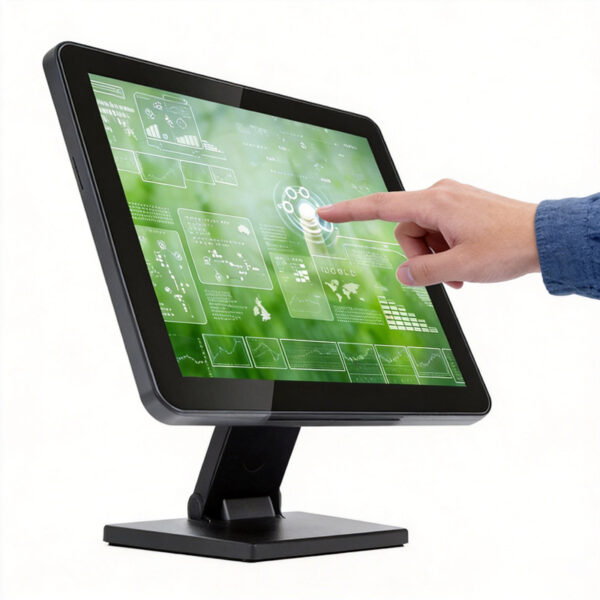
Choosing a monitor touch screen engineered with multi-point capacitive touch, USB plug-and-play connectivity, and durable plastic housing delivers rapid transaction speeds while cutting hardware spending drastically. Available in fifteen inch, seventeen inch, and nineteen inch screen sizes, this cashier display operates twenty-four seven without needing an internal operating system. Direct factory supply eliminates high brand markups, providing outstanding cost performance, low power consumption, and long operational lifespans for retail checkout lines and self-service kiosks today.
This commercial interactive display complies with strict international electronic hardware safety compliance rules (CE safety standards, FCC electromagnetic compatibility rules, and RoHS lead-free compliance certifications) while maintaining high touch sensitivity across continuous daily checkout shifts. Meanwhile, flexible mounting options allow quick integration into tight retail spaces, protecting equipment against accidental liquid spills and heavy physical taps. As a result, store managers increase checkout efficiency while securing reliable interactive displays affordably today. Explore our complete product-category catalog to order commercial touch monitors online now.
4 Frequent Retail Display System Bottlenecks Draining Store Revenue
Store managers, restaurant owners, and self-service kiosk operators continuously battle slow customer checkouts, touch registration lag, and expensive display replacement costs. Sourcing overpriced brand-name POS terminals drains capital budgets, while cheap consumer monitors break down rapidly under heavy commercial usage. Retail technology specialists regularly highlight four major operational failure points across conventional checkout display setups.
Excessive All-In-One Terminal Costs Draining Retail Tech Budgets
Proprietary all-in-one POS terminals bundle expensive internal processors and operating systems, inflating store hardware procurement expenses unnecessarily. Business owners spend thousands buying integrated computers, leaving minimal budget for scanner upgrades or receipts printers. Consequently, retailers struggle to expand checkout lanes while paying high hardware replacement fees continuously. Direct USB secondary display sourcing delivers identical touch accuracy and crisp video input at a fraction of standard terminal costs.
Lagging Resistive Screens Causing Long Customer Checkout Lines
Outdated resistive touch displays require heavy physical pressure to register cashiers inputs, causing frequent missed taps during peak shopping hours. Slow input response delays item scanning, payment processing, and digital receipt generation across busy cashier registers. Therefore, impatient shoppers endure long queue wait times while retail employees suffer daily operational frustration. Sensitive multi-point capacitive touch technology registers light finger taps instantly, accelerating checkout speed noticeably.
Cluttered Cable Setups and Rigid Mounting Options Restricting Checkout Space
Bulky commercial displays with proprietary power adapters clutter narrow cashier counters, leaving zero room for impulse buy displays or card payment terminals. Fixed display stands prevent flexible angle adjustments, forcing cashiers to work in uncomfortable ergonomic postures throughout long work shifts. Thus, store staff experience wrist fatigue while customer interactions feel awkward and restricted. Universal VESA mounting support and simplified USB connectivity streamline counter layouts effortlessly.
Fragile Consumer Grade Monitors Failing Under Continuous Commercial Usage
Standard office monitors lack rugged plastic housings and sealed glass panels, making them vulnerable to daily commercial wear and tear. Accidental food spills, grease marks, and harsh cleaning sprays degrade internal circuitry quickly, causing sudden display failure. As a result, store managers face unexpected maintenance invoices, closed register lanes, and lost sales revenue. Durable plastic housings with reinforced front panels withstand twenty-four seven commercial usage reliably.
Technical Solutions: USB POS Monitor Touch Screen Architecture
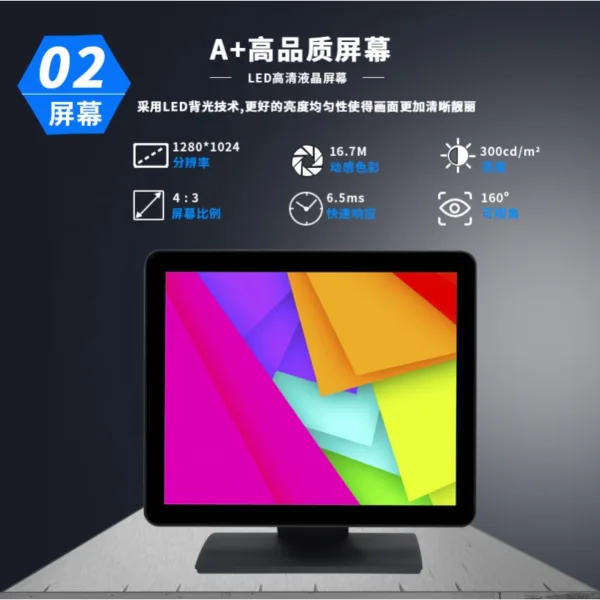
Our commercial cashier display combines multi-point capacitive touch sensors, USB plug-and-play signal processing, lightweight resilient housing, and flexible mounting options.
High-Sensitivity Multi-Point Capacitive Touch Technology
Engineered with premium capacitive glass panels, this display registers light finger touches with high speed and pinpoint accuracy. The smooth glass surface resists scratches, grease, and moisture, maintaining flawless touch tracking across millions of cashier taps. Furthermore, check out our helpful technical-guide regarding touch driver setup, screen calibration steps, and dual display configuration settings.
Plug-and-Play USB Integration with Zero System Overhead
Operating as a high-speed secondary display, this screen connects directly via USB to existing POS terminals, mini PCs, or laptops. Eliminating internal operating systems lowers power consumption while avoiding software crash risks, virus infections, or costly operating system license fees. Consequently, retail IT managers deploy new cashier stations in minutes without installing complex software drivers or reconfiguring network setups.
Durable Lightweight Housing and Flexible Screen Sizes
Available in fifteen inch, seventeen inch, and nineteen inch formats, this space-saving monitor fits various checkout counter footprints easily. The rugged plastic housing protects internal components against impacts, while flexible desktop stands and wall mounts optimize viewing angles for operators. Additionally, direct factory supply delivers commercial-grade reliability at an extraordinarily friendly, budget-pleasing price point today.
Technical Specifications & Commercial Touch Screen Comparison
The chart below compares our USB POS Monitor Touch Screen against expensive all-in-one terminals and low-cost consumer displays.
| Specification Parameter | USB POS Monitor Touch Screen | Expensive All-In-One Terminal | Low-Cost Consumer Display |
| Touch Sensor Tech | Multi-Point Capacitive | Resistive or Single Touch | Non-Touch or Basic Touch |
| Operating System | Zero Internal OS Required | Pre-installed Proprietary OS | Zero Internal OS Required |
| Interface Connection | Single High-Speed USB Port | Complex Multi-Cable Port | Standard VGA / HDMI Only |
| Screen Sizes Offered | 15 Inch / 17 Inch / 19 Inch | Fixed Single Screen Size | Variable Non-POS Sizes |
| Duty Cycle Rating | 24/7 Continuous Operation | 12/7 Standard Operation | 8/7 Light Home Usage |
| Housing Durability | Resilient Plastic Housing | Heavy Metal Chassis | Fragile Plastic Shell |
| Mounting Flexibility | Desktop Stand / VESA Mount | Fixed Desktop Stand | Basic Desktop Stand Only |
| Overall Cost Value | Superior Direct Factory Value | Low Value (High Markup) | Low Value (Breaks Easily) |
Versatile Deployments Across Commercial Interactive Sectors
Consider these primary commercial deployment scenarios when choosing a cost-effective touch monitor for your facility today.
-
Supermarket & Retail Cashier Lanes: Accelerate barcode scanning and payment workflows using sensitive fifteen inch touch screens.
-
Restaurants & Fast Food Counter POS: Process customer orders quickly and display digital menus using seventeen inch capacitive displays.
-
Self-Service Ticketing & Order Kiosks: Mount nineteen inch interactive monitors into custom kiosks for self-checkout convenience.
-
Hospitality & Hotel Check-in Desks: Streamline guest check-in procedures and digital signature collection using sleek USB touch displays.
Maximize your checkout productivity and achieve the ultimate hardware investment value today! Browse our wide product-category selection to order your monitor touch screen now.