
Modern businesses need smart technology to boost daily customer engagement.
Consequently, an interactive touch screen display monitor transforms user interaction immediately.
These commercial monitors unify digital visual content with direct touch input controls.
Furthermore, responsive touch surfaces replace awkward physical keyboards and mice completely.
Interactive systems demand rugged reliability across demanding commercial environment settings.
For instance, lead-free compliance guarantees high environmental safety standards globally.
Engineers routinely deploy our premium touch screen display monitor products today.
Therefore, digital transformation elevates modern user experience right at touchpoints.
Pain Point Scenarios in Modern Commercial User Interaction
Slow Transaction Processing with Outdated Keyboard Inputs
Traditional cash registers rely on complex manual key shortcuts and buttons.
Cashiers spend extra seconds searching through physical keys during rush hours.
Additionally, miskeyed entries delay queues and cause frustrating customer waiting lines.
As a result, slow input methods reduce daily store sales potential significantly.
High Screen Failure Rates in High-Traffic Self-Service Kiosks
Unrated consumer displays break down quickly under constant public touch usage.
Scratched screen surfaces lose touch sensitivity after a few months of use.
Furthermore, unsealed casings collect internal dust, causing constant screen calibration errors.
Consequently, frequent kiosk downtime increases maintenance expenses for smart businesses.
Poor Screen Visibility and Narrow Viewing Angles
Low-quality display monitors distort vibrant brand colors when viewed from sides.
Customers misread visual menus due to weak backlights under ambient lights.
Moreover, slow touch response times irritate users expecting instant smartphone speed.
Thus, poor display responsiveness harms brand reputation during critical user interactions.

Technical Solutions and Data-Backed Performance
Ergonomic 17-Inch Screen Design Delivers Precise Visual Output
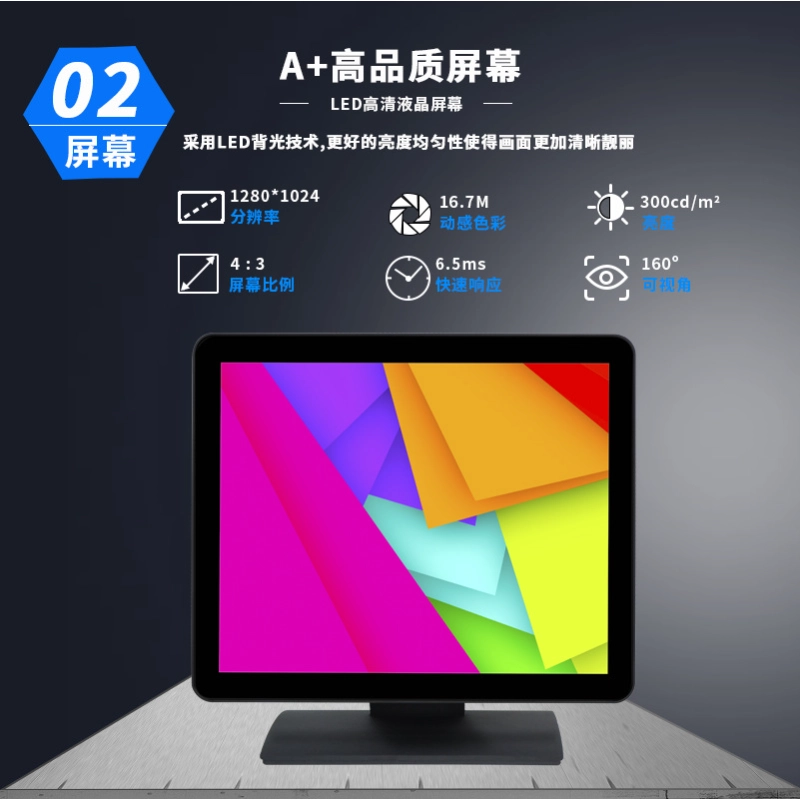
A commercial touch screen display features a 17-inch screen size.
Specifically, its 4:3 display ratio provides an optimal 337×272 mm active area.
The crisp 1280×1024 standard resolution renders detailed menus and graphic icons clearly.
Its 300 cd/m² display brightness ensures clear viewing under bright lights.
Additionally, 16.7M vivid colors and 1000:1 contrast ratio enhance visual quality.
Fast Multi-Point Capacitive Touch Ensures Immediate Response
The multi-point capacitive touch system delivers a fast 5ms touch response time.
Users tap options smoothly with over 1,000,000 valid touch operations guaranteed.
Engineers offer optional resistive, SAW, or infrared touch technologies for needs.
Furthermore, flexible USB 2.0 or RS232 interfaces connect host systems instantly.
Explore full setup guidelines in our touch screen integration guide.
Durable Construction Built for Continuous 24/7 Operation
A durable lightweight plastic housing protects sensitive internal components against impacts.
The panel delivers an impressive 50,000-hour backlight lifespan for continuous operation.
Additionally, low power consumption under 30W reduces long-term operational electric costs.
The monitor operates reliably in broad temperatures ranging from -10 to 60°C.
Overall, wide operating system support includes Win7, Win10, Raspberry Pi, and Android.
Detailed Product Parameters and Feature Comparison
| Hardware Specification | Legacy Consumer Monitor | Commercial Touch Screen Display Monitor |
| Panel Size & Aspect Ratio | 15.6″ Wide (16:9) | 17″ Standard (4:3 Ratio, 337×272 mm) |
| Standard Resolution | 1024 × 768 Pixels | 1280 × 1024 High-Definition Pixels |
| Display Brightness | 200 cd/m² | High 300 cd/m² Brightness |
| Touch Response Time | Slow (>12ms) | Ultra-Fast 5ms Response Time |
| Touch Validity Rating | < 100,000 Touches | Over 1,000,000 Valid Taps |
| Backlight Lifespan | ~20,000 Hours | Durable 50,000 Hours Lifespan |
| Signal Connectors | Basic VGA Only | Standard VGA + HDMI + USB (RS232 Optional) |
| System Compatibility | Basic Windows Only | Win7/8/10, Raspberry Pi, Android, Linux |
| Environmental Compliance | Basic RoHS | Lead-Free Compliance & CE / FCC |
Elevating Commercial Interactions with Smart Displays
Deploying a POS interactive display monitor streamlines customer self-service workflows completely.
Users navigate interactive digital menus faster, make payments smoothly, and avoid errors.
Furthermore, resilient hardware construction protects your commercial investment for years.
Discover our full line of interactive touch screen display monitors today.