
Choosing a 4K touch screen monitor requires careful consideration. Commercial buyers should evaluate resolution, touch response, and durability. They should also consider installation and operating environments.
Today, businesses use commercial touch screen monitors across many industries. Retail stores need responsive POS interfaces. Hotels require convenient customer service terminals. Meanwhile, public venues need clear information displays.
However, not every commercial application requires 4K resolution. A suitable touch screen monitor should match actual usage needs. Therefore, buyers should compare display specifications and purchasing costs.
Does Every Commercial Business Need a 4K Touch Screen Monitor?
Display resolution influences image clarity and content presentation. However, different commercial environments have different requirements.
Retail counters often prioritize convenient operation. Meanwhile, digital information displays may require detailed visuals. Therefore, buyers should evaluate screen size and viewing distance.
How Should Buyers Choose the Right Resolution?
A 4K display provides 3840 by 2160 pixels. It suits applications requiring detailed visual content.
However, Full HD remains practical for many commercial interfaces. A 1920 by 1080 pixel display supports everyday POS operations. It also provides clear information for customer-facing applications.
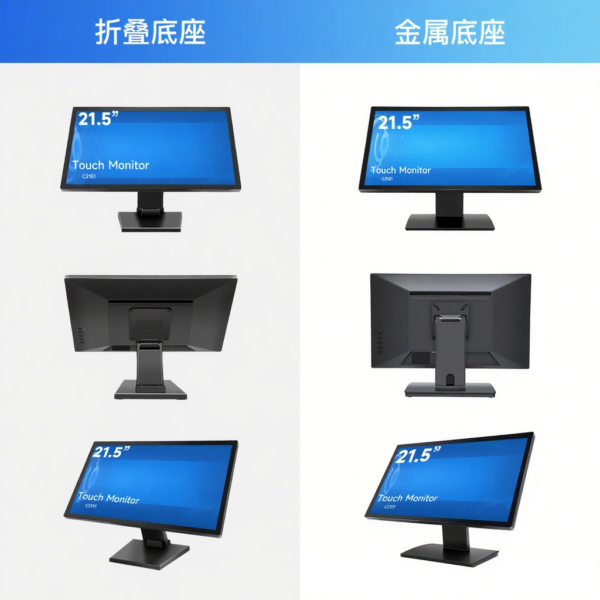
Our 21.5-inch IPS touch screen monitor uses Full HD resolution. It offers a 16:9 display format. Additionally, its IPS panel supports wide viewing angles.
This configuration suits many retail and hospitality environments. It also offers a practical balance between functionality and cost.
How Important Is Touch Responsiveness for Commercial Operations?
Commercial employees interact with displays throughout their shifts. Therefore, responsive touch control supports efficient workflows.
A suitable capacitive touch screen monitor should recognize user input smoothly. It should also support comfortable daily interaction.
What Touch Technology Supports Everyday Business Use?
This 21.5-inch monitor features multi-point capacitive touch. It offers a five-millisecond touch response time.
Additionally, buyers can choose optional touch technologies. These include resistive, SAW, and infrared solutions.
Each technology suits different operating environments. Capacitive touch supports common interactive interfaces. Meanwhile, alternative technologies offer additional installation flexibility.
The monitor also supports USB or RS232 touch interfaces. Therefore, businesses can consider different connection requirements.
Can a Commercial Touch Screen Monitor Handle Long Working Hours?
Commercial displays often operate throughout business hours. Therefore, buyers should consider construction and service life.
Retail counters and hospitality desks need dependable equipment. Stable operation also helps businesses manage maintenance costs.
Which Design Features Support Daily Operation?
This monitor uses a high-strength plastic housing. Its construction supports regular commercial applications.
The product specifies a rated operating life of 50,000 hours. Its touch surface also supports over one million touches.
Furthermore, the display offers 250 candelas per square meter brightness. Its contrast ratio reaches 1000:1.
These specifications support everyday indoor applications. They help buyers evaluate product suitability before purchasing.
What Installation Options Should Commercial Buyers Consider?
Different businesses use different counter and mounting layouts. Therefore, installation flexibility matters during equipment selection.
Some retailers prefer desktop placement. Meanwhile, information terminals may require wall mounting.
How Can Flexible Mounting Simplify Installation?
This commercial touch monitor supports multiple installation options.
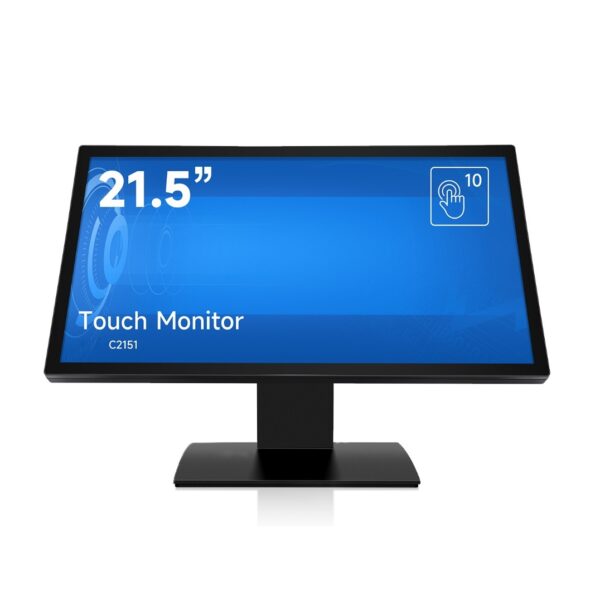
Its standard package includes a foldable desktop stand. Buyers can also choose an optional metal anti-shaking stand.
Additionally, VESA mounting supports 75 and 100 millimeter patterns. This arrangement provides more installation flexibility.
The monitor also includes VGA and HDMI connections. Furthermore, buyers can select USB or RS232 touch interfaces.
These options help businesses plan suitable workstation layouts. They also simplify equipment integration.

What Specifications Should Buyers Compare Before Ordering?
Wholesale purchasing requires more than checking screen resolution. Buyers should also review touch technology, connections, and installation.
Additionally, they should consider product costs and operating requirements. A clear specification comparison supports better sourcing decisions.
Which Features Matter Most for Commercial Applications?
The following table summarizes the main specifications. Buyers can use it when evaluating commercial touch screen monitors.
| Item | Product Specification | Commercial Value |
|---|---|---|
| Screen Size | 21.5 inches | Suitable for desktop applications |
| Panel Type | IPS | Wide viewing angles |
| Resolution | 1920 by 1080 pixels | Full HD image presentation |
| Refresh Rate | 75 hertz | Smooth everyday display |
| Brightness | 250 candelas per square meter | Suitable for indoor environments |
| Contrast Ratio | 1000:1 | Clear visual presentation |
| Response Time | 5 milliseconds | Responsive display performance |
| Touch Technology | Multi-point capacitive | Convenient interactive control |
| Touch Response | 5 milliseconds | Responsive touch operation |
| Interfaces | VGA, HDMI, USB, optional RS232 | Flexible connectivity |
| Service Life | 50,000 hours rated | Supports long-term planning |
| Mounting | VESA 75 and 100 millimeters | Flexible installation |
| Housing | High-strength plastic | Practical commercial construction |
The product offers useful configuration options. However, buyers should confirm certifications separately. The available product specifications do not list specific certifications.
Find the Right Touch Screen Monitor for Your Business
Choosing a 4K touch screen monitor starts with understanding application requirements. Resolution, touch response, and installation all influence purchasing decisions.
For many commercial environments, Full HD provides practical functionality. Our 21.5-inch IPS touch screen monitor combines responsive capacitive touch and flexible mounting.
Moreover, its high-strength plastic housing supports everyday commercial use. Its competitive configuration also offers purchasing value for business buyers.
Whether you serve retail or hospitality customers, suitable display equipment matters. Explore our commercial touch screen monitors and product options.
Explore Our Touch Screen Monitor Collection.For technical selection support, visit our guide below.
Commercial Touch Screen Monitor Technical Guide.Contact our team to discuss your purchasing requirements. We welcome wholesale inquiries and commercial project cooperation.